Trade Manager sits under Chart Trader and manages every entry you make with its own buttons - no ATM template, no strategy to enable.
Stop in ticks, or a max loss in dollars for the whole position - re-sized automatically when you add.
Target in ticks or a dollar goal. Set Max fills in today's room to max from Prop Desk.
One click to entry plus your offset; right-click for quick picks, any offset or Auto BE. Details below.
3 bars back, X bars back, a fixed tick distance, or keep all open profit except $X - optionally starting after +N ticks.
Room to max, max loss left today and target hit - in plain words, amber or flashing red.
Follow the leader on copy accounts, a live spread box, coloured Chart Trader buttons, and light or dark themes.
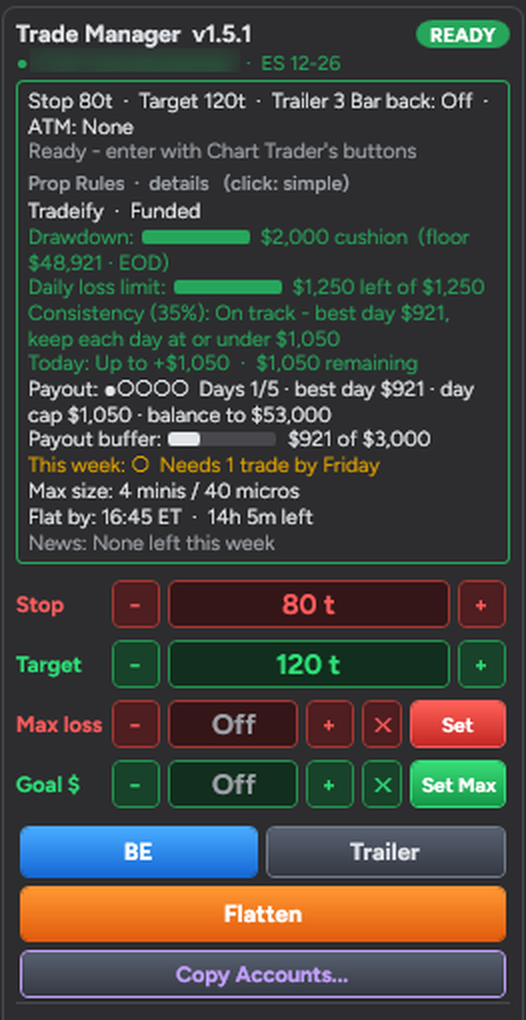
With Prop Desk running, Trade Manager shows a live Prop Rules card for the account on your chart - drawdown cushion, daily loss limit, consistency, today's room, payout progress, max size and flat-by time - and uses those numbers for you.
Real Trade Manager panel on a funded account (account number blurred).
Left-click does the job. Right-click either button for its settings - they are remembered per chart, and the button always shows what it will do.
Your own plans per account size and phase (eval, high-risk eval, funded): max risk per trade, day stop, daily goal, break-even point and R. Tick a plan and Load Plan Settings fills in stop, target and contracts for the market you trade - capped at the firm's max size.
Default stop and target ticks, step size for the +/− buttons, max loss and goal in dollars, labels on the stop and target lines, light or dark theme - all in the indicator properties.
Trade one account, copy to others: copies follow the leader's entries, adds and exits, skip accounts the broker has locked and never open the opposite side of a position you already hold.
Stops are never moved back. A trade Trade Manager already manages keeps its stop and target until you are flat - even if something else changes.